
Curio 34
Capture More Than Notes

Gather your notes, research, and documents in Curio’s intuitive, freeform notebook environment. Integrated tools for brainstorming, outlining, mind mapping, tasks, and more help you shape ideas and move your work forward. And every project is a local file on your Mac — private, offline-ready, and yours.


Curio Overview
See how Curio's integrated tools and freeform environment transform the way you capture, organize, and develop your ideas.


What’s New in Curio 34
Our biggest release in years.


=[@Price]*[@Quantity] and =SUM([Quantity]).
TEXT formatters such as =TEXT(SUM([Sales Tax]),"$#,##0.00").


Curio 34 Feedback
Curio 34 feedback
“Curio 34 is a moonshot that worked. So many devs are just bolting on a ‘talk to my notes’ integration with MCPs, which, IMO, is weak and not interesting in the long run. Curio 34 is built for the long run.”
Recent Highlights
We’re always working on new productivity features.


Compare Curio Editions
Click a feature to learn more in the documentation.
| Standard | ProProfessional | |
|---|---|---|
| Notebook Environment | ||
 Project notebook environment with intuitive freeform idea spaces. |
||
 Rich text figures with support for bundled and custom figure styles. |
||
 Paragraph and character text styles for managing consistent text formatting across a project, with paragraph styles for entire paragraphs and character styles for inline ranges. |
||
 Line height and paragraph spacing controls for multiplier, minimum, exact, and grid-based spacing. |
||
 Markdown text figures with extensive syntax support for bold, italics, underline, strikethrough, highlight, inline code, links, LaTeX inline and block equations , wikilinks, headers, emoji, images, lists, checklists, dashed lists, tables, block quotes and callouts, code blocks, and horizontal rules. |
||
 Embedded and aliased files, images, PDF’s, audio, videos, Mail messages, web links, web preview cards, and embedded live web views. |
||
 [[Wikilinks]] and backlinks, Markdown links, links to selected text or embedded PDF text, jump actions, jump anchors, idea space link figures, and hyperlinks. |
||
 |
||
 Hierarchical Organizer sections for independent divisions in larger projects. |
||
Integrated Journal for a project diary, meeting notes, or class notes. |
||
 Follow Figures and Bundle Figures for lightweight figure groupings. |
||
 Automatic project backups for peace of mind. |
||
 Bundled appearance themes to change the look of your Curio interface. |
||
 Multiple project windows open for the same project. |
||
 Color inspector sliders and eyedropper with RGB, OKLCH, OKLAB, and HSL color spaces, plus instant screen color sampling. |
||
 Word count status bar module with detailed readability and sentiment metrics including Flesch-Kincaid and Gunning Fog. |
||
 Home button in navigator controls for instantly jumping to a designated Home idea space. |
||
| Collections | ||
 Compositions provide flexible, dynamically-sized arrangements of contained figures including text, images, files, plus lists, mind maps, tables, and more. Tabloid compositions create newspaper-style layouts with flexible rows and columns, while matrix compositions provide structured, simplified grids. |
||
 Mind mapping with left, right, top-down, right-down, tree, and org chart arrangements; branch boundary shading; relationship lines; date calculations. |
||
 Lists from simple to-do’s to complex hierarchical lists, numbered or bulleted, checkboxes, level styles, date calculations. |
||
 Albums of photos or documents, such as PDFs, with optional captions. |
||
 Index cards for organizing your notes. |
||
 Tables with headers, footers, numeric formatting, and column sorting . |
||
 Pinboards for freeform collections of text and images. |
||
 Stacks for task tracking and layout grouping. |
||
Kanban boards that automatically generate sorted stacks from groupings like priority, rating, tag sets, and dates for Trello-style task organization. |
||
Generate color palettes for list and mind map branches using OKLCH-based hue spreading from a base color. |
||
 Table of Contents list or mind map. |
||
 Focus mode to help you concentrate on specific figures, branches, or connected idea graph figures . |
||
| Meta | ||
 Figure meta including checkmarks; percent complete; project and global keyword tags, project and global tag sets; start, due, duration, done, plus smart date calculations; priorities; ratings; resources; notes; custom click actions. |
||
 Flexible adornment positioning with 12 placement positions around a figure, plus separated checkbox adornments and collection-level overrides. |
||
 Organizer meta flags column. |
||
 Status bar to view and edit figure meta data. |
||
 Search and Quick Find to quickly find and jump to idea spaces and figures with simple or complex queries including regular expressions and boolean logic. |
||
 |
||
| Multimedia and PDFs | ||
 Create and embed audio and video recordings. |
||
 Embed YouTube videos. |
||
 SVG images. |
||
 Placeholder images for easy swapping, perfect for stencils. |
||
 Resample images to optimize format, compression, dimensions, and DPI. |
||
 Markup images to crop, annotate, highlight, and scribble on an image. |
||
 Brush and pen sketching with support for iPad+Apple Pencil via Sidecar. |
||
Integrated equation editor for LaTeX, AsciiMath, or MathML rendering of inline or standalone equations. |
||
 Spread PDF to spread the pages of a PDF across multiple idea spaces for inline annotations and note-taking alongside each PDF page. |
||
| Flowcharting | ||
 Flowcharting shapes for idea graphs, diagrams, and prototyping. |
||
 Sticky lines with numerous arrowhead choices; straight, curved, or orthogonal; with support for multiple line labels. |
||
| Assistants | ||
 Sleuth window and Sleuth sidebar shelf for integrated Internet searching via popular research and image sites like Google, Wikipedia, and more. |
||
 AI Services including ChatGPT, Claude, Gemini, Copilot, Perplexity, Poe, Groq, Grok, Mistral, DeepSeek, Qwen, and local LLM chat servers are also available from within Sleuth. |
||
| macOS Integrations | ||
 Curio App Intents bring Curio into Apple Shortcuts with native actions for opening projects, finding items, reading the current selection, navigating, exporting, and importing into the current idea space. |
||
 Curio Query widget for macOS Desktop and Notification Center are available to keep project query results visible at a glance. |
||
| Import / Export | ||
 Import/export as text, Markdown, image, PDF, HTML, CSV, OPML, and 3rd party mind map formats. |
||
PDF Mirror live export of your project as a PDF to any specified location, including synced cloud services. |
||
PDF Table of Contents in exports. |
||
 Sync tasks to Calendar & Reminders. |
||
 Local library shelf to easily list, find, preview, open, and drag in files anywhere on your Mac or within custom scope folders, including support for DEVONthink items. |
||
 TaskPaper import and export and OmniOutliner Pro OPML import. |
||
 Works with Curiota: our free, always available menu bar app for quickly jotting down ideas, taking notes, or collecting files when inspiration strikes. |
||
| Pro Power User Functionality Advanced features for power users and productivity gurus, exclusive to our flagship Pro edition. | ||
Smart Kanban boards backed by search queries that dynamically generate stacks filled with synced figure instances from across a project. |
||
Table formulas and Markdown table formulas with Excel-like structured references, SUM, AVERAGE, MIN, MAX, and more. |
||
 Mermaid figures, Mermaid in Markdown code blocks, and Mermaid Organizer documents for advanced diagramming. |
||
Markdown language code blocks with syntax coloring. |
||
 Synced figure instances where one or more copies of figures can share content and meta across an entire project, plus synced collection instances for lists, mind maps, and stacks . |
||
 Sync Files where figures can sync the contents of text figures and list, mind map, stack, and table collection figures to external local or cloud-hosted files, either bidirectionally, export only, or import only. |
||
 File-backed text figures display the content of embedded or aliased rich text or Markdown files, located on disk or in the cloud, as editable text figures. |
||
 Figure layers allow for more flexible layouts and arrangements. |
||
 Figure references supporting custom types like Agree and Evidence between figures, idea spaces, and web locations, with a dedicated References panel in the Meta inspector . |
||
 Status shelf for easy cross-project task tracking at a glance. |
||
Curio Status widget mirrors the Curio Pro Status shelf on the macOS Desktop and in Notification Center for cross-project task tracking at a glance. |
||
 Query-based collections allow you to create list, mind map, or stack collections that contain the dynamic results of a query, like due<2w or #active. |
||
 Master figure styles & stencils, master idea space styles & templates, and master Markdown styles for dynamic updates throughout a project. |
||
 Presentation mode for group brainstorming sessions, plus Present in Window for remote window sharing, and a Jump To context menu for navigating idea spaces during presentations . |
||
 Custom figure data allows custom keys and formatted values to be associated with your project figures and available for search queries. |
||
 Custom variables for use throughout your project for dynamic text replacements. |
||
 Custom sharing actions to export data to other apps via 3rd party app URL schemes. |
||
Custom appearance themes to fine-tune the look of your Curio interface. |
||
Custom project backup settings. |
||
 External project library to support Spotlight searching of project assets. |
||
 External repositories for sharing styles, stencils, and templates with colleagues. |
||
 Project password for project security. |
||
| Special Perks For Sustainers Sustainers are customers who either have an active subscription or are still within the one-year update period of their perpetual license. | ||
 Custom app icons featuring creative, fun styles like cartoon, clay, glass, oil painted, and more. |
||
 Curio CLI command line tool for Terminal users, scripts, and AI workflows, with a built-in MCP server for AI clients like ChatGPT Desktop, Codex, Claude Desktop, and Claude Code. Give your favorite AI access to all your Curio data to rewrite text, fine-tune images, perform queries & analysis, import and export data, set meta values, and much more. |
||


Discounts on new licenses are available for qualifying staff, faculty, and students of accredited educational organizations.
If the email address you enter below is a school-issued email address, such as .edu, .k12, .ac.uk, or other recognized academic domains, we may be able to instantly qualify you for academic pricing when you press Continue.
👉 Your new license will be issued to this email address!
Otherwise, please upload your proof of academic eligibility, issued by the institution with your name and institution name, dated within the past 12 months.
Examples: a school ID card, report card, transcript, tuition bill. PDF, JPEG, HEIC, or PNG. Max 2MB.
Questions or need a pre-validation code instead?
Enter your current license information to see your license renewal and crossgrade options. License renewals include one full year of free major updates!
If upgrading from an old purchase of Curio 7 Core or Curio 11 Express from the Mac App Store then follow .
Find your current license key via the Curio > License menu item. (Or we can send it to you.)
👉 Your new license will be issued to this same email address! (Email changed?)
We’ll show your exact renewal and crossgrade prices once we’ve checked your license. Students and teachers can ask for academic pricing on the next screen.
Customer Quote
“Curio is the centerpiece of my learning life, which is about 80% of life itself for me nowadays, so I really appreciate all the improvements the app has gone through over the years.”
Try Curio For Free
Begin your 2-week trial from the Mac App Store if you prefer a monthly or yearly subscription, or from our website if you prefer a license key purchase.
Billed yearly. Affordable and always up to date. Subscription managed by Apple.
One-time purchase. Includes 1 year of updates. Doesn’t expire. Renew anytime.
Free
Great for trying Curio and small projects. Compare ›
No purchase required
For smaller projects
Highlights include:
- Projects restricted to 5 idea spaces
- Rich text & Markdown with LaTeX equations
- Mind maps, lists, tables, and kanban stacks
- Tags, dates, priorities, and search
- Web research via Sleuth, with ChatGPT, Claude & Gemini
- Import/export as PDF, Markdown, and more
Standard
Kickstart your productivity with amazing features and functionality with projects unlimited in size. Compare ›
Renewals
as low as
Curio 34 Standard License Renewals
From Curio 33: $59.99 ($49.99 edu). 🤗
Otherwise: $69.99 ($59.99 edu).
$59.99 ($49.99 edu).
/ month
Everything in Free, plus:
- Unlimited number of idea spaces for expansive research, planning, and note-taking projects of any size
Most popular
Professional
Our flagship and most comprehensive offering with advanced features for power-users and productivity gurus. Compare ›
Renewals
as low as
Curio 34 Professional License Renewals
From Curio 33: $79.99 ($69.99 edu). 🤗
Otherwise: $89.99 ($79.99 edu).
$79.99 ($69.99 edu).
/ month
Everything in Standard, plus highlights like:
- Curio CLI + MCP for AI chatbots and agents like ChatGPT and Claude
- Smart Kanban & query-based collections
- Table & Markdown table formulas
- Synced figures, collections, and files
- Mermaid diagrams & code blocks
- Presentation mode & Status shelf

Includes 2-week free trial with all Pro features enabled.
No purchase required.
👉 Already have a subscription? Download from the Mac App Store instead.
👉 Already have a license key? Download from our website instead.
Prices in USD. Taxes may apply.
Curio 34 runs on macOS 15 Sequoia through macOS 27 Golden Gate on Apple silicon or Intel.
Curio downloaded from Zengobi only works with license keys, not Mac App Store subscriptions.Curio downloaded from the Mac App Store only works with Apple’s subscriptions, not license keys.
Release Notes - Online Documentation (PDF) - Zengobi License AgreementApple License Agreement - Terms of Use - Privacy Policy
Curio 34 runs on macOS 15 Sequoia through macOS 27 Golden Gate on Apple silicon or Intel.
Curio downloaded from Zengobi only works with license keys, not Mac App Store subscriptions.Curio downloaded from the Mac App Store only works with Apple’s subscriptions, not license keys.
Release Notes - Online Documentation (PDF) - Zengobi License AgreementApple License Agreement - Terms of Use - Privacy Policy
Subscriptions vs License Keys
Should I choose a subscription or license key?
Both options give you access to nearly all Curio features, with some minor differences due to App Store requirements:
Choose a subscription if: You want lower upfront cost, one-click installation, automatic updates to the latest release, and the convenience of the Mac App Store — especially if you only need Curio periodically.
Choose a license key if: You prefer a one-time purchase, want control over when you renew updates, need academic or volume discounts, want access to beta releases, or need specific features like AppleScript figure actions support.
See our complete Subscription FAQ and License Key FAQ for detailed differences.
How does the 2-week trial and free mode work?
Mac App Store: Download Curio from the Mac App Store to start a 2-week trial immediately with all Professional features enabled. If you later subscribe to a Standard or Professional plan, Curio unlocks the appropriate features and Apple handles billing and renewal.
Website: Download Curio from our Zengobi website to start a 2-week trial immediately with all Professional features enabled.
After the trial: If you don’t subscribe or buy a license, Curio continues in free mode (Standard features, up to 5 idea spaces). Larger projects open read-only for viewing, exporting, and printing.
How do subscriptions work?
Subscriptions are purchased monthly or yearly through the Mac App Store, with Apple handling transactions and renewals. If you cancel or let your subscription expire, Curio reverts to free mode. Manage your subscription anytime in your Apple account settings.
Note: Only Curio downloaded from the Mac App Store supports subscriptions.
How do license keys work?
A license key is a one-time purchase for the current version of Curio plus a full year of free major updates. After that, Curio doesn’t expire — it simply stops receiving updates until you renew. You can renew at any time to update to the latest release.
Note: Only Curio downloaded from our website supports license keys.
Can I use Curio on multiple Macs?
Subscriptions (Mac App Store): Follows Apple’s standard app agreement for installations on Macs you own or control.
License keys (website): Installation is allowed on multiple Macs you personally own or control (see our License Agreement).
Are academic and volume discounts available?
Subscriptions (Mac App Store): Academic and volume discounts aren’t supported.
License keys (website): Students and educators are eligible for a discount with academic verification. Quantity purchases of 20+ receive an automatic 20% volume discount at checkout.
I have more questions!
See our complete Subscription FAQ and License Key FAQ, or email us.
Video Gallery
ChatGPT and Curio CLI
0:59 • 7/21/2026
Welcome to Curio!
1:23 • 5/19/2020
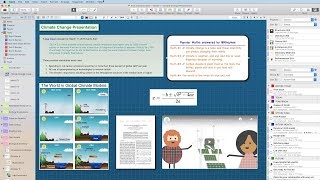
Curio Interface Overview
4:27 • 4/2/2019
Text Styles
0:29 • 8/20/2026
Compositions
0:22 • 6/11/2024
Synced Figure Instances
2:17 • 6/14/2022
File-Backed Text Figures
2:17 • 6/7/2022
What's New in Curio 30
3:00 • 10/9/2024
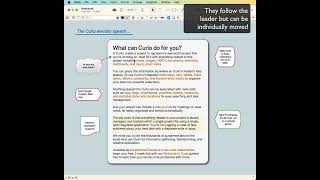
Follow Figures
0:55 • 5/24/2023
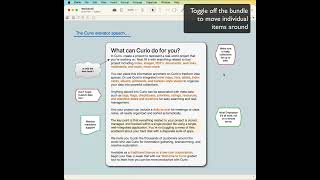
Bundle Figures
1:10 • 5/24/2023
Continuity Camera
0:10 • 5/22/2019
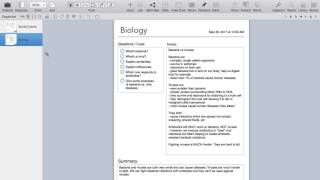
Master Idea Space Templates
7:50 • 5/29/2017
Master Figure Stencils
1:24 • 5/22/2017
Master Styles
1:38 • 5/17/2017

Tutoriots Review
24:31 • 4/11/2017

ScreenCastsOnline Preview
1:06 • 3/2/2017

Curio Sightings
Learn how customers are using Curio.
 Software of the Month: Curio
Curio for Thinking and Knowledge Management

Zengobi Curio - Should I purchase it?
Curio + Bookends/Zotero/EndNote/Papers
 Zengobi Forums
Brandon Sanderson outlining
Zengobi Forums
Curio sample: coding classes
Zengobi Forums
Better use of Curio
Zengobi Forums
Curio as outliner
Zengobi Forums
Story planning
Zengobi Forums
Huge Shoutout on Overtired
 Overtired Podcast
Updated Curio tutorial on ScreenCastsONLINE
 ScreenCastsONLINE
Organising literature in Curio
Zengobi Forums
Use for Development of a New College Course
Zengobi Forums
Academic workflow for subject recruitment, scheduling, etc
Zengobi Forums
User case studies or usage for Curio
Zengobi Forums
Workflow: music teacher
Zengobi Forums
Curio used for a lawyer's briefcase
Zengobi Forums
Curiota Companion App
Curiota: Curio’s Little Buddy

Curiota is our free, out of the way yet always available menu bar app that allows you to quickly jot down ideas, take notes, or collect files when inspiration strikes.
You can also send text or files into Curiota via macOS Services, the macOS Share button, the print dialog’s Save PDF to Curiota option, a browser bookmarklet, and even AppleScript.
While Curiota can be used even if you don’t own Curio, when combined with Curio you have a powerhouse combination since Curiota helps you collect notes and files outside of Curio. Then, when you’re back in Curio, you can view, search, and access all your collected Curiota information directly using Curio’s Library.

Subscribe to our newsletter or follow us on to keep up with the latest Curio product news.